A care team with a patient at the bedside
Built in Kampala for clinics, hospitals and health centres

Run your hospital. Not paperwork.

PearlCare HMS takes every patient from the front desk to discharge on one record — triage, doctor queue, lab, pharmacy, wards and billing — so nothing is repeated, lost or left unbilled.

We set it up, move your data, train your staff and stay with you through go-live.

See pricing
12
Connected modules
6
Staff roles
2 days
Staff training
30 days
Satisfaction period

The problem

Paper and disconnected systems slow everyone down

A doctor writing on a paper prescription pad

Every handwritten slip is a record someone has to copy again.

At the lab, at the pharmacy, at the cashier, and again at month-end.

TodayA patient visits three departments and repeats their history three times.

With PearlCareRegistered once. Triage, consultation, lab, pharmacy and billing all open the same record.

TodayThe pharmacy runs out of a drug nobody knew was low.

With PearlCareStock drops as each prescription is dispensed, and low-stock items show on the dashboard.

TodayConsultations, lab tests and bed days slip through without being billed.

With PearlCareDispensed medicines and bed charges go on the invoice automatically, and discharge is blocked until the balance is zero.

TodayEnd-of-month reports take days to assemble from paper registers.

With PearlCarePayments, expenses, P&L, invoice and OPD reports for any date range, exported to Excel or PDF.

The patient journey

One patient, ten steps, one record

Every role owns part of the journey, and each step picks up where the last one left off.

Register

01

Receptionist

Search first, then add the patient once. A patient number and printable QR card are issued.

Triage

02

Nurse

Temperature, BP, pulse, SpO₂, blood sugar, weight and pain score. BMI is calculated for you.

Book visit

03

Receptionist

Book a consultation, follow-up, procedure or lab test with a doctor.

Doctor queue

04

Doctor

Each doctor sees “Your Queue Today” and starts, continues, completes or hands off visits.

Consult

05

Doctor

History, examination, diagnosis and plan, with triage vitals already filled in.

Lab tests

06

Doctor / Lab

Order from the test catalogue, record results with Normal, High, Low or Critical flags, print the report.

Pharmacy

07

Doctor → Pharmacist

Prescriptions land in the pharmacy queue. Dispensing reduces stock and adds the drugs to the bill.

Billing

08

Cashier

Invoice every service and record cash, Mobile Money, bank transfer or insurance payments.

Admit

09

Doctor

Pick a free bed on the live bed board. Daily bed charges are added automatically.

Discharge

10

Doctor

Discharge only once every invoice is cleared, then print the discharge summary.

Outpatient visit steps 1–8  ·  Inpatient stay steps 9–10

A hospital laboratory

See it in action

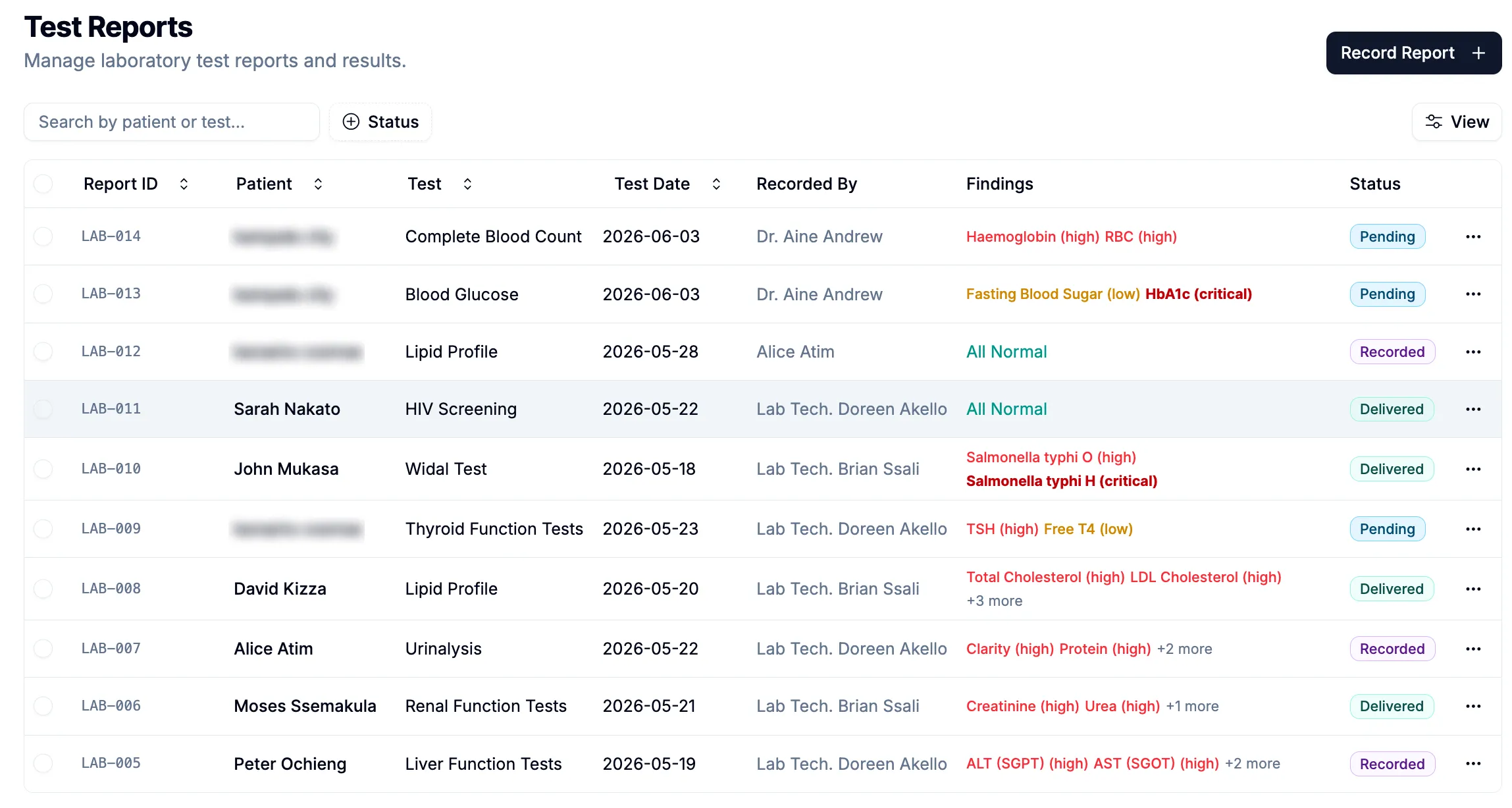
Lab results your doctors can read at a glance

High, low and critical findings are flagged right in the list, so nothing urgent waits in a pile.

PearlCare Test Reports screen listing lab reports with flagged findings such as HbA1c (critical) and statuses Pending, Recorded and Delivered
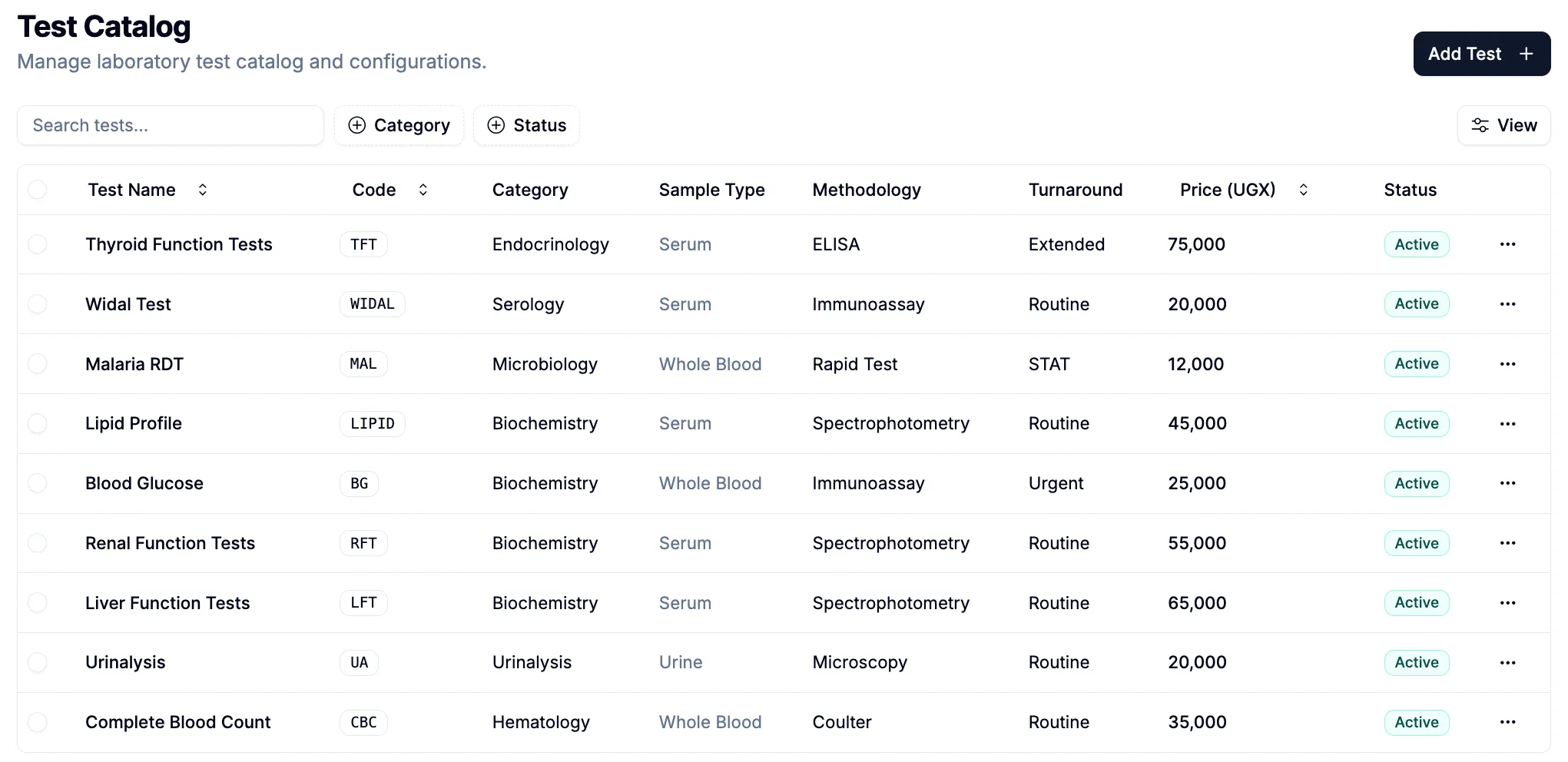
PearlCare Test Catalog screen with test codes, categories, sample types, turnaround and prices in UGX

Result flags

NormalHighLowCritical

Priced tests from your own catalogue fill the result rows automatically.

Screens from the PearlCare demo environment with sample data. Some test-patient details are blurred.

Everything in one system

Every module, included in every plan

No feature tiers to compare. Every PearlCare subscription comes with the full system.

Patient Registration & EMR

One profile per patient with consultations, prescriptions, lab reports, invoices, admissions and a full timeline.

Appointments & Doctor Queues

Book visits by doctor and type. Doctors work a live daily queue and hand patients off at shift change.

Triage & Consultations

Nurses capture vitals; doctors record history, examination, diagnosis and treatment plan in four clear sections.

Laboratory & Diagnostics

Priced test catalogue, structured results with reference ranges and flags, Pending → Recorded → Delivered tracking.

Pharmacy & Inventory

Prescription queue, dispensing from stock, walk-in sales, consumables usage and low-stock alerts.

Wards & Bed Management

Colour-coded bed board, admissions, transfers and automatic daily bed charges per ward.

Billing & Payments

Invoices with discounts and tax, payments by cash, Mobile Money, bank or insurance, and printed receipts.

Reports & Analytics

Live dashboard plus payments, expenses, P&L, invoice and OPD reports, exportable to Excel and PDF.

Staff, Roles & Permissions

Every staff member has their own login and sees only the menus their role allows.

Imaging & Scans

Scan requests go straight to the imaging queue; the radiographer records findings and the report goes back to the doctor.

Data Security & Backup

Secure cloud hosting, regular backups and an audit trail of who did what, and when.

Maternity & ANC

ANC visits and investigations, a printable ANC card, the labour partograph, deliveries and newborn records.

Patient records

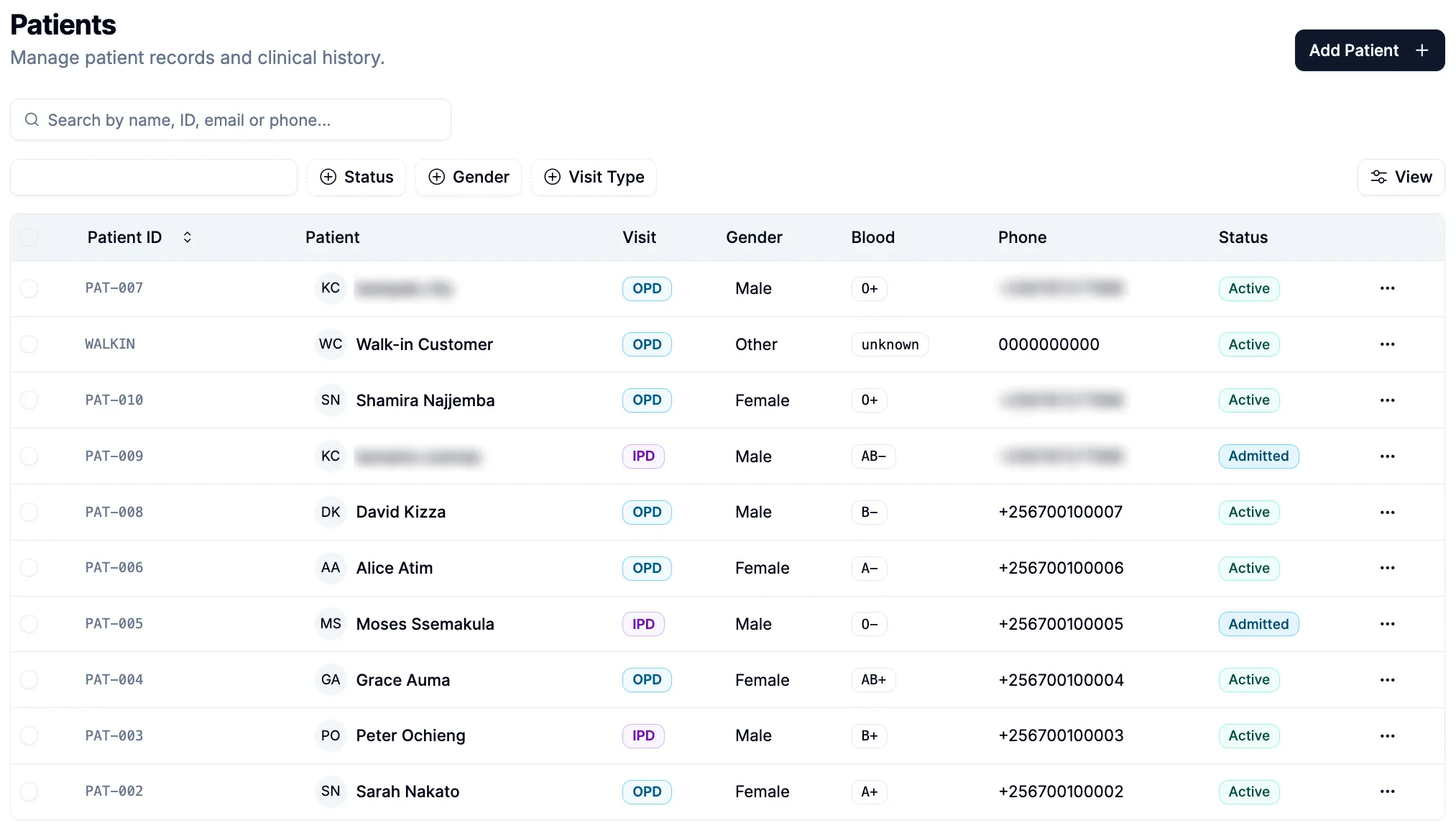
Every patient, one searchable list

Search by name, patient ID, email or phone. Filter by status, gender or visit type, and see at a glance who is outpatient, who is admitted and who needs attention.

  • Patient number issued on registration
  • OPD and IPD status always visible
  • Open any profile for the full history
PearlCare Patients screen listing patients with ID, visit type, gender, blood group, phone and status

Reports

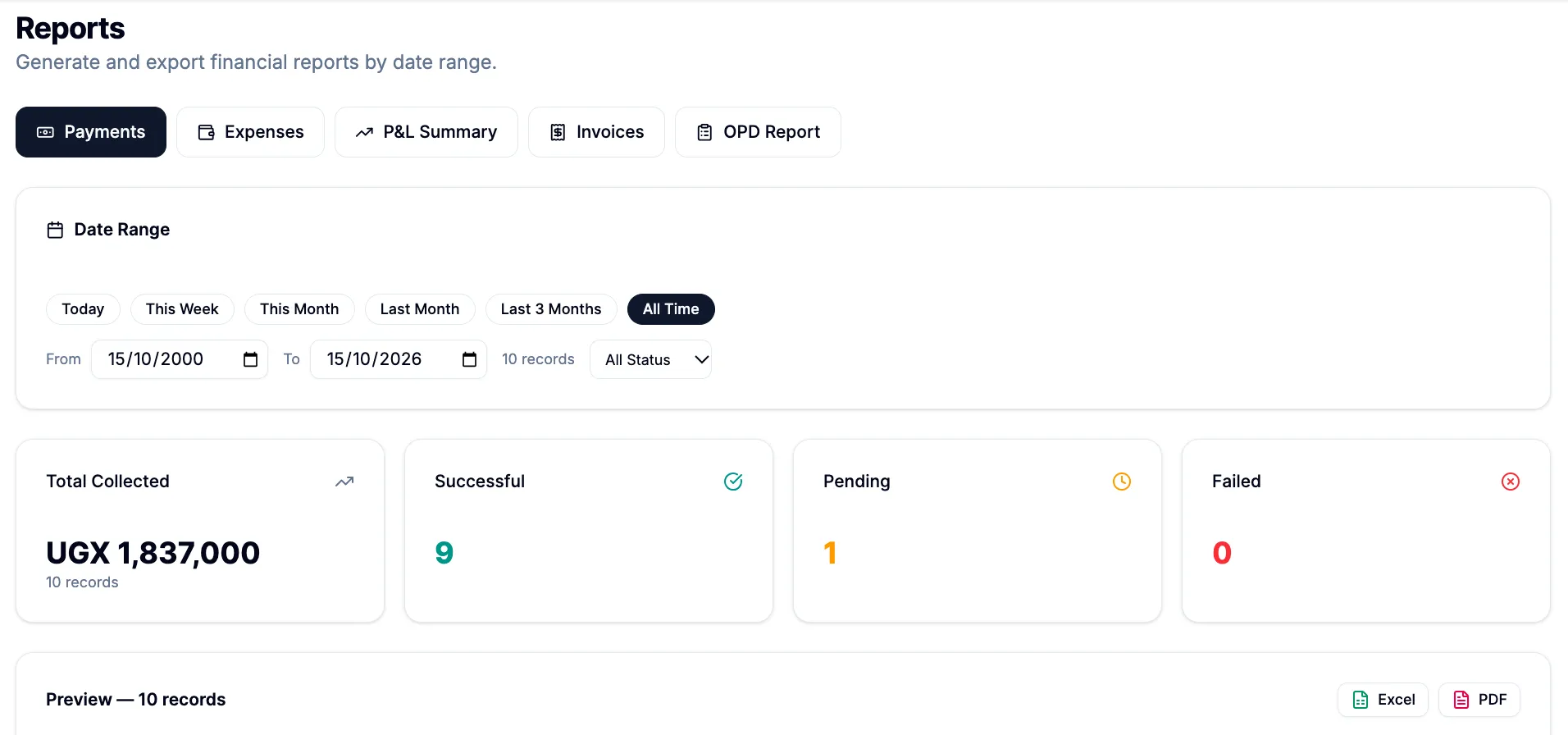
Know where the money is, without the spreadsheet

Payments, expenses, profit and loss, invoices and OPD reports for today, this month or any date range, with totals by status and one-click Excel or PDF export.

  • Collected, pending and failed payments
  • P&L summary from recorded expenses
  • Export to Excel or PDF for your accountant
PearlCare Reports screen showing payments totals for a date range with Excel and PDF export buttons

Built around your team

Each person sees exactly what their job needs

Every staff member signs in with their own account — never a shared one. Their role decides which menus they see, and sensitive actions are protected: only a doctor can discharge, and only once the bill is paid in full.

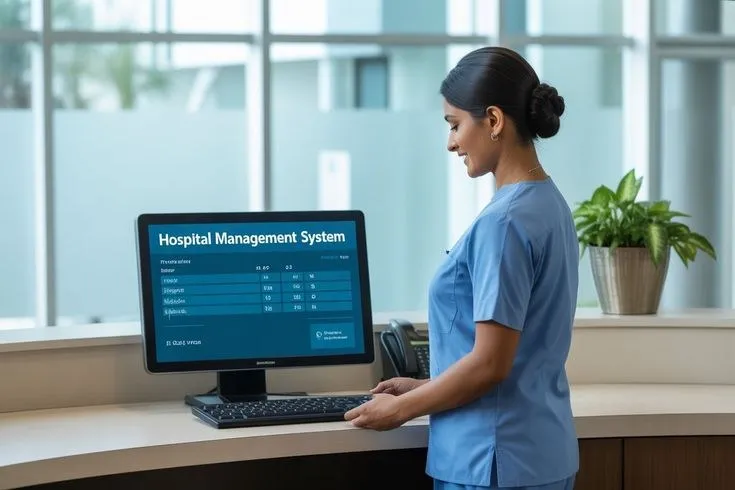
A receptionist at a hospital front-desk computer

Receptionist

Register · Book visit · Invoice

Receptionist

Registers patients, books appointments, creates invoices.

Nurse

Records triage vitals, updates patients, helps with beds.

Doctor

Works the queue, consults, prescribes, orders labs, admits and discharges.

Pharmacist

Dispenses prescriptions, handles walk-in sales, manages stock.

Cashier / Accountant

Records payments and collects balances before discharge.

Administrator

Manages users, roles, departments, wards, beds and settings.

Who it's for

Built for every kind of facility

Hospitals

Outpatient and inpatient care, with wards, beds, admissions and discharge.

Health Centres

High-volume OPD with triage, doctor queues, lab and pharmacy on one record.

Clinics

Small teams getting off paper, with up to 8 staff accounts included.

Getting started

We don't just hand you a login

Our team sets PearlCare up for your facility and stays with you until it is part of everyday work.

  1. 1 to 2 days

    1. Setup & configuration

    We set up your departments, services, price lists, staff accounts, roles and print templates for invoices, prescriptions and lab reports.

  2. 2 days

    2. Staff training

    Hands-on training for every staff member, covering only the parts of PearlCare their role uses.

  3. First 3 to 7 days

    3. Go-live support

    Our team is on site or on call during your first days of live use to answer questions straight away.

  4. 2 to 4 weeks after

    4. Follow-up check-in

    We review how it is going, refine the setup and train on any gaps.

Moving off paper and Excel

  1. 1We list what you have today: paper registers, patient files, Excel sheets, price lists and stock records.
  2. 2You fill in simple templates for staff, services and prices, drugs, lab tests and opening stock.
  3. 3We clean and check the data for duplicates and missing fields, then load it.
  4. 4Active patients in digital form are imported in bulk. Paper records are captured as patients return.
  5. 5You review a sample and sign off before go-live. Paper is kept only as a short-term backup.

Your data stays yours

All patient and hospital data remains the property of your facility. We keep it confidential, and you get a full export if you ever leave.

30-day satisfaction period

If PearlCare doesn't meet the agreed scope within 30 days of go-live, cancel in writing, get that period's subscription refunded and take your data with you.

Pricing

One complete system. Pay monthly or yearly.

Pricing depends on your number of staff and facilities. Tell us about your facility and we'll send you a quote.

Monthly plan

Contact us for pricing

Paid monthly in advance. Cancel with 30 days' written notice.

1 month free

Annual plan

Contact us for pricing

12 months paid upfront for the price of 11.

Every plan includes

  • All 12 modules
  • Up to 8 staff accounts
  • 1 facility
  • Secure hosting and regular backups
  • Software updates and fixes
  • Ongoing technical support
  • A website for your facility, designed and built by us

Getting you live

  • Setup and configuration
  • Staff training (2 days, all staff, by role)
  • Data migration from paper and Excel
  • Go-live support for the first 3 to 7 days
  • Follow-up check-in 2 to 4 weeks after go-live

One-time setup and training are included in your quote.

Need more? Quoted on request:

FAQ

Questions facilities ask us

Who owns our data?

You do. All patient and hospital data remains the property of your facility. We treat it as confidential, and if you ever leave we give you a full export of your data.

What if PearlCare doesn’t work for us?

You can use PearlCare for 30 days from go-live. If it does not meet the agreed scope, cancel in writing within those 30 days, get the subscription fee for that period refunded, and receive an export of your data.

We still use paper files. Do we need to type them all in first?

No. We import your setup data and any patient records you already have in digital form. Paper records for active patients are captured at registration during the first weeks, so the system fills up naturally. Bulk typing of historical files can be quoted separately.

Do we need to install anything?

No. PearlCare runs in the web browser on the computers you already have. Each staff member signs in with your organisation code and their own email and password.

How long until we are live?

Setup takes 1 to 2 days and staff training 2 days. We then stay on site or on call for your first 3 to 7 days of live use and check in again 2 to 4 weeks later.

Which payment methods can we record?

Cash, Mobile Money, bank transfer and insurance. Direct Mobile Money integration with MTN MoMo or Airtel Money is available as an add-on.

How do we get help?

Support is included for the whole subscription. There is a built-in Help Center in the app, or reach us by WhatsApp, phone or email, Monday to Saturday, 8 AM to 6 PM.

More answers on the full FAQ page.

The outside of a hospital building

Ready to move your facility off paper?

Book a free demo. We'll walk through a full patient journey using your own departments and services.

WhatsApp us

support@pearlcarehms.com  ·  0705 129090 / 0789 409328

Mount Olives Country Mall, Kiwaatule, Kampala  ·  Mon – Sat, 8:00 AM – 6:00 PM